Getting Started
This guide is the Cockpit v2 quick-start for integrating Oracle Transparent Data Encryption (TDE) with DuoKey. By the end you will have Oracle using DuoKey as an external HSM keystore for its TDE master key, with the master key never residing on the database host.
The integration uses an access_token bearer credential, a pkcs11.toml configuration file, and the libdke_pkcs11.so provider. The access_guid embedded in the proxy URL is a separate, non-secret routing identifier — not the credential.
The authoritative pkcs11.toml schema and every DKE_PKCS11_* override is documented once, in PKCS#11 Provider Configuration (pkcs11.toml).
How it fits together
Oracle keeps doing the bulk table and tablespace encryption itself, in hardware, with AES-NI. DuoKey is only on the master-key path — opening the keystore, SET KEY, and wrapping/unwrapping the tablespace keys under the master encryption key (MEK).
DuoKey is only on the master-key path; bulk crypto stays local on the database host.
Prerequisites
Oracle Database
- Oracle Database 11g R2, 12c, 18c, 19c, 21c, or 23ai
- Oracle Advanced Security option licensed
- DBA access with
SYSDBAand theADMINISTER KEY MANAGEMENTsystem privilege
For Oracle 11g R2, ensure patch 18948524 is applied.
DuoKey's engineering runbooks are actively validated against Oracle Database 19c and later (including Oracle XE 21c), or Oracle Key Vault — the DuoKey provider is a standards-based Cryptoki library with no Oracle-version-specific code, but confirm current compatibility with your DuoKey contact before integrating an 11g R2 / 12c / 18c database.
DuoKey
- Access to your DuoKey Cockpit v2 web interface
- The DuoKey PKCS#11 provider library, supplied by DuoKey
- Network connectivity from the database server to the Cockpit host over HTTPS (port 443)
The provider must be built for the exact glibc of your database host — do not assume this from the Oracle version. Check the real value with ldd --version | head -1 before requesting a build. For example, Oracle's own official 19.3.0.0 Enterprise Edition container image runs Oracle Linux 7.9 / glibc 2.17, not OL8. A library compiled against a newer glibc will fail to load and Oracle reports ORA-28353 with no additional log. Use the build DuoKey provides for your confirmed platform.
System
- A Linux server whose glibc matches the library build DuoKey provides (verify with
ldd --version, don't assume from the Oracle version) - Root or sudo access, and the Oracle instance owner account (
oracle)
Step 1: Create the Oracle TDE app in Cockpit
-
Sign in to your DuoKey Cockpit v2 URL and open Apps in the sidebar.
-
Click + New App, choose the Oracle TDE type, and give it a name (typically one app per database instance). The app provisions an initial active master key (AES-256), an
access_guid(routing identifier), and anaccess_token(bearer credential).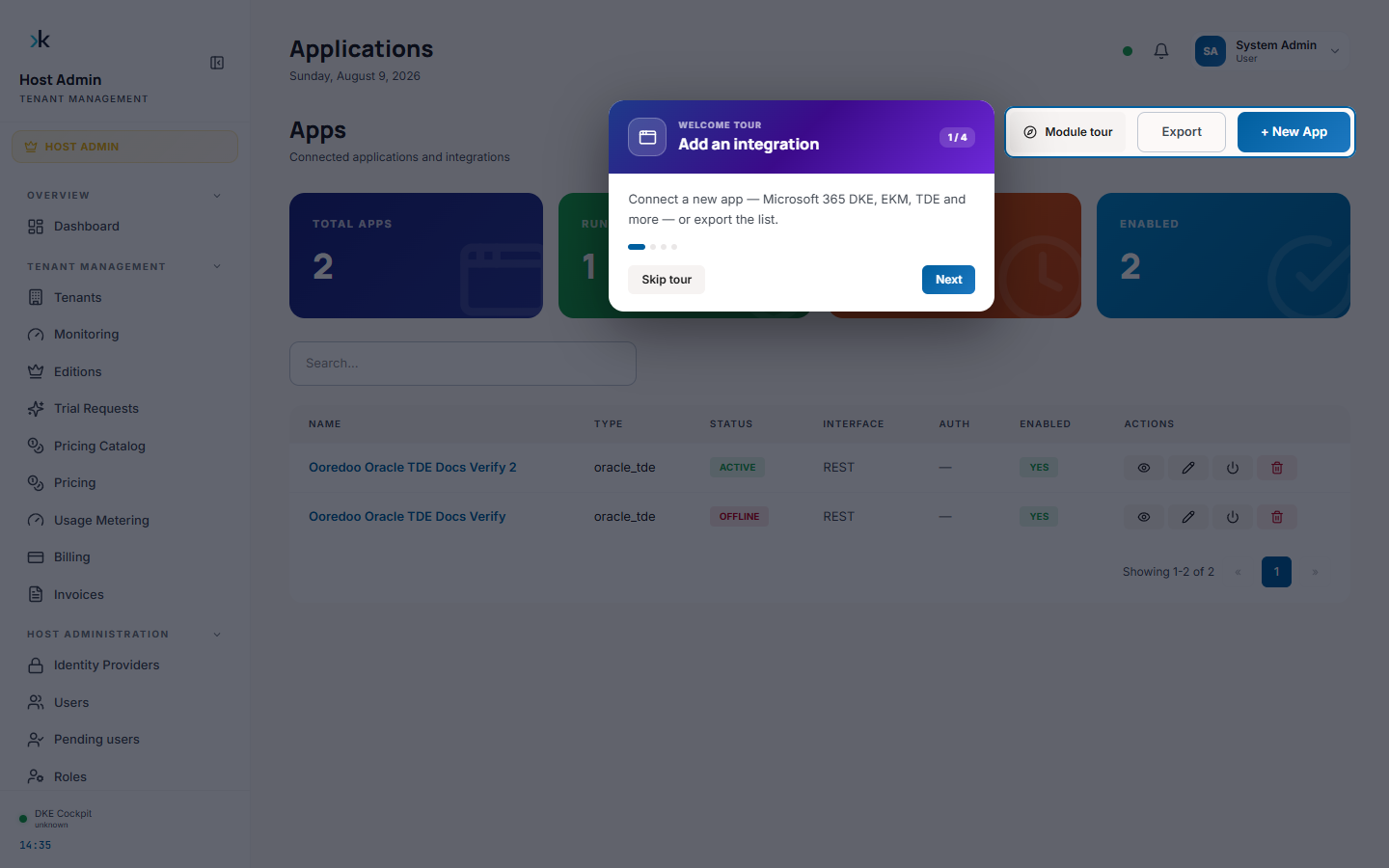
-
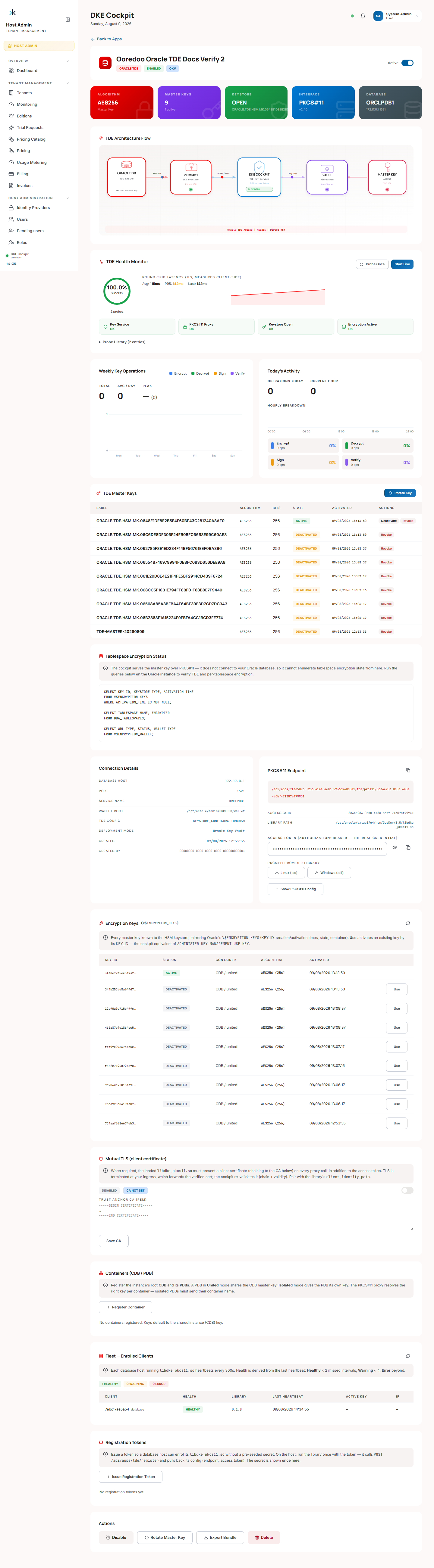
Open the app's detail page. It shows the live architecture flow, the TDE master key history, a health monitor probing the PKCS#11 proxy, and the connection/PKCS#11 configuration cards:
-
In the PKCS#11 Endpoint card, reveal the Access Token field (eye icon) if you need to inspect it manually, and use the Linux (.so) / Windows (.dll) buttons to fetch the provider library, or Show PKCS#11 Config to view just the
pkcs11.toml: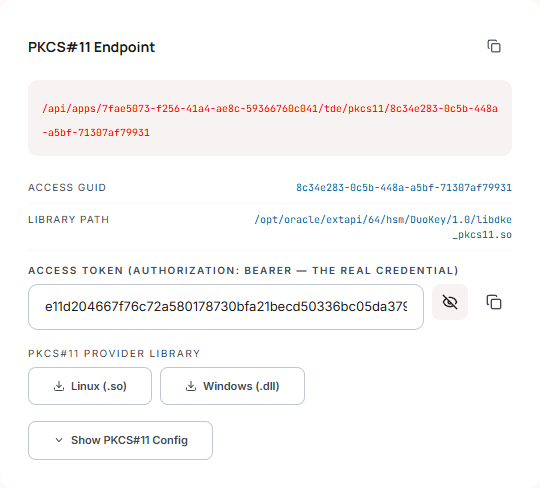
-
For the full deployment package, scroll to Actions at the bottom of the page and click Export Bundle. The Cockpit generates everything you need for this database in one file:
- the
pkcs11.tomlfile (with the correctserver_url,access_guid, andaccess_token), - the install commands for the PKCS#11 library,
- the environment exports (including
DKE_PKCS11_CONF), - the Oracle SQL scripts, in the corrected run order used throughout this guide.
- the
Cockpit v2 authenticates every request with an access_token bearer credential (Authorization: Bearer <access_token>). The access_guid embedded in the server_url path is a separate, non-secret routing identifier used server-side to select the app — it is not the credential, since URL paths can end up in reverse-proxy or ingress access logs outside DuoKey's control. There is no OAuth2, no client ID/secret, no username/password, and no tenant header — the tenant is resolved server-side. Treat the whole bundle as sensitive and never commit it to version control.
Step 2: Verify connectivity
From the database server, confirm the Cockpit host is reachable over HTTPS. Use the API-serving hostname, not the frontend one — Cockpit v2 typically separates the two (for example cockpit-api-<env>.duokey.cloud for the API vs cockpit-<env>.duokey.cloud for the browser UI). Hitting the wrong one is a common mistake: the request still succeeds with HTTP 200, but returns the frontend's HTML shell instead of a JSON response, which looks like a working connection until the PKCS#11 provider tries to parse it:
curl -v https://<cockpit-api-host>/api/apps/<app_id>/tde/pkcs11/<access_guid>
A GET on the app's proxy URL acts as a readiness probe and should return JSON ({"ok":true,"status":"ready",...}). If it returns an HTML page instead, you have the wrong hostname. If the connection fails outright, check that port 443 is open, DNS resolves, and TLS certificates are trusted (for on-premise Cockpit, add its CA to the OS trust store).
Step 3: Install the DuoKey PKCS#11 provider
Place the library unchanged into Oracle's PKCS#11 vendor directory. Oracle loads the first shared object it finds in the vendor/version directory by any filename — do not rename it to libpkcs11.so.
# Standard Oracle Database location
sudo mkdir -p /opt/oracle/extapi/64/hsm/DuoKey/1.0
sudo cp libdke_pkcs11.so /opt/oracle/extapi/64/hsm/DuoKey/1.0/

# Set ownership for the Oracle user
sudo chown -R oracle:oinstall /opt/oracle/extapi/64/hsm/DuoKey
sudo chmod -R 755 /opt/oracle/extapi/64/hsm/DuoKey
Deploying on Windows? The artifact is dke_pkcs11.dll, but the vendor directory, config-file permissions, and one other Windows-specific gotcha are different enough to warrant their own page — see Getting Started on Windows. On Oracle Key Vault, the vendor path is /usr/local/okv/hsm/generic/ instead.
Oracle loads the first .so in /opt/oracle/extapi/64/hsm/DuoKey/1.0/ regardless of its name. Keep only the DuoKey library in that directory so the correct provider is loaded.
/opt/oracle/extapi/64/hsm/... is a fixed scan location, the same on every install regardless of where your Oracle software actually lives. Confirmed live: on Oracle Database 12.1.0.2 Enterprise Edition (official Oracle image, real ORACLE_BASE=/u01/app/oracle), the library was never found until it was placed under the literal /opt/oracle/... path — placing it under the real $ORACLE_BASE/extapi/... (e.g. /u01/app/oracle/extapi/...) does not work. This mirrors the already-documented Windows behavior (C:\oracle\extapi\..., independent of ORACLE_HOME/ORACLE_BASE) — see Getting Started on Windows. If your database's ORACLE_BASE isn't /opt/oracle, deploy to the fixed path anyway, not your real ORACLE_BASE.
Step 4: Place the configuration file
Copy the pkcs11.toml from the deployment bundle to a protected location and point the provider at it with the DKE_PKCS11_CONF environment variable (set in the Oracle user's profile). Restrict the file to the Oracle user:
sudo chown oracle:oinstall /etc/dke/pkcs11.toml
sudo chmod 600 /etc/dke/pkcs11.toml
export DKE_PKCS11_CONF=/etc/dke/pkcs11.toml
The bundle's pkcs11.toml already contains the [http_config] server_url (with app_id and access_guid), the access_token bearer credential, timeout_secs, verify_tls, and the [pkcs11] slot_id, logging_level, and logging_folder. Individual fields can be overridden per host with DKE_PKCS11_* environment variables. See PKCS#11 Provider Configuration (pkcs11.toml) for the full schema.
Step 5: Configure Oracle for HSM-based TDE
Connect as SYSDBA and run the SQL from the deployment bundle. The keystore type is HSM.
5.1 Set the wallet root and TDE configuration
ALTER SYSTEM SET WALLET_ROOT='<oracle-base>/admin/<sid>/wallet' SCOPE=SPFILE;
-- Restart to apply WALLET_ROOT
SHUTDOWN IMMEDIATE;
STARTUP;

ALTER SYSTEM SET TDE_CONFIGURATION='KEYSTORE_CONFIGURATION=HSM' SCOPE=BOTH;
5.2 Open the HSM keystore
ADMINISTER KEY MANAGEMENT SET KEYSTORE OPEN
  IDENTIFIED BY "<pin>"
  CONTAINER = ALL;
For the DuoKey provider the real credential is the access_token bearer in pkcs11.toml; the IDENTIFIED BY value is advisory, but it must be a literal quoted string.
IDENTIFIED BY EXTERNAL STORE does not work with this providerConfirmed against a live Oracle 19c container: IDENTIFIED BY EXTERNAL STORE raises ORA-00988: missing or invalid password, because it requires a real local auto-login/OS-external-store keystore, and the PIN here is only a syntactic placeholder. Always use a literal quoted PIN.
Oracle's default HSM connection heartbeat can close the keystore between two separate manual sqlplus sessions, surfacing as ORA-28365: wallet is not open on the very next statement even though SET KEYSTORE OPEN reported success moments earlier. Run keystore-open and the dependent operation (SET KEY, ALTER TABLESPACE … ENCRYPT) in the same script/session.
5.3 Set the TDE master key
ADMINISTER KEY MANAGEMENT SET KEY
  IDENTIFIED BY "<pin>"
  WITH BACKUP
  CONTAINER = ALL;
The master key is AES-256.
Key the root first, then key each PDB in its own session. A PDB that is not OPEN READ WRITE during a CONTAINER=ALL rekey raises ORA-46664.
ALTER SESSION SET CONTAINER = <pdb_name>;
ADMINISTER KEY MANAGEMENT SET KEY IDENTIFIED BY "<pin>" WITH BACKUP;
Step 6: Verify
SELECT wrl_type, status, wallet_type FROM V$ENCRYPTION_WALLET;
Expected:
WRL_TYPE: HSMSTATUS: OPEN
Create an encrypted tablespace to confirm end to end:
CREATE TABLESPACE encrypted_ts
  DATAFILE '<oradata-path>/encrypted_ts01.dbf' SIZE 128M
  ENCRYPTION USING 'AES256' DEFAULT STORAGE(ENCRYPT);
Then confirm the key operations appear in the Cockpit audit log for this app.
Key rotation
Rotate the master key from the Cockpit. Rotation makes a new key active and deactivates but keeps the previous key, so tablespace keys wrapped under the old MEK stay decryptable. The Cockpit returns the Oracle rotation SQL (ADMINISTER KEY MANAGEMENT SET KEY … WITH BACKUP).
Next steps
- Deployment Bundle Example (Linux) — the exact file this guide's Export Bundle step generates.
- Key Management — rotation, migration, RAC and Data Guard, backup and recovery.
- Best Practices — security, performance, and operational recommendations.
- Oracle TDE Integration (Cockpit v2) — the Cryptoki operations and MEK lifecycle in detail.
Troubleshooting
Library fails to load (ORA-28353, no log) — the library was built against a newer glibc than this host's. Confirm the host's glibc with ldd --version | head -1 (don't assume it from the Oracle version — the official 19.3.0.0 EE image is OL7.9/glibc 2.17) and use the matching build from DuoKey.
ORA-28365: wallet is not open — re-open the keystore:
ADMINISTER KEY MANAGEMENT SET KEYSTORE OPEN
  IDENTIFIED BY "<pin>" CONTAINER = ALL;
ORA-46664 on a multitenant rekey — a target PDB was not OPEN READ WRITE. Open the PDB (or key it individually) and retry.
Connectivity — verify port 443 to the API hostname (not the frontend one — see Step 2), the server_url in pkcs11.toml, and (on-premise) the CA trust. A curl that returns HTTP 200 with an HTML body instead of JSON means server_url points at the frontend, not the API. Provider logs are written to the logging_folder (default /var/log/dke-pkcs11).
For every other error code and a full debugging checklist, see Troubleshooting. Deploying on Windows instead? See Getting Started on Windows.
Support
- Email: [email protected]
- Documentation: DuoKey Support
- Status: status.duokey.com