CBOM - Cryptography Bill of Materials
CBOM - Cryptography Bill of Materials
Generate standardized Cryptography Bill of Materials (CBOM) following the OWASP CycloneDX 1.7 specification for comprehensive cryptographic asset inventory and risk assessment.
Overview
CBOM (Cryptography Bill of Materials) is a specialized inventory format for documenting all cryptographic assets in your applications and infrastructure. The PQC Scanner generates CycloneDX 1.7 compliant CBOM documents that can be:
CBOM Capabilities
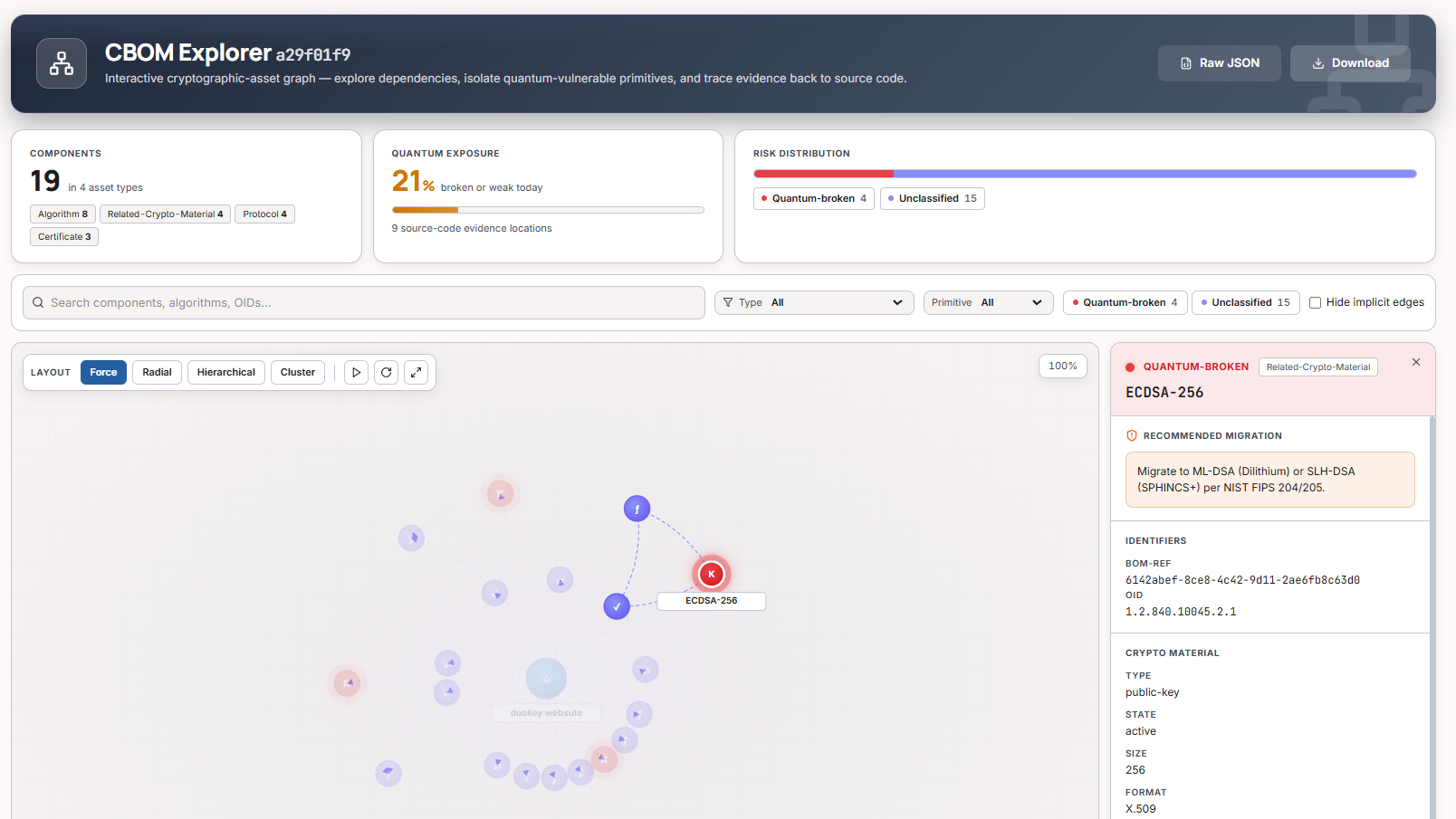
CBOM Explorer
In the Cockpit, the CBOM Explorer renders the CycloneDX inventory as an interactive cryptographic-asset graph — you can isolate quantum-vulnerable primitives, inspect a component's identifiers (BOM-Ref, OID, key type/size, format) and see the recommended migration for each broken algorithm.
What is CycloneDX?
CycloneDX is an OWASP standard for Software Bill of Materials (SBOM). Version 1.7 introduced native support for cryptographic assets, making it the de-facto standard for CBOM.
Quick Start
Generate CBOM from Scan Results
# 1. Run a scan
dke-scanner-agent inventory --output scan-results.json

# 2. Generate CBOM
dke-scanner-agent cbom --input scan-results.json \
  --app-name "Payment API" \
  --app-version "2.1.0" \
  --output payment-api-cbom.json
View CBOM Summary
# Generate with pretty printing
dke-scanner-agent cbom -i scan.json --pretty

# Output shows:
# CBOM generated successfully!
# Input: scan.json
# Output: scan-cbom.json
# Components: 47
# Dependencies: 12
Use Cases
Security Audit & Compliance
Generate CBOM for annual security audits and compliance reports
CI/CD Integration
Automate CBOM generation in deployment pipelines
Quantum Readiness Tracking
Track migration progress from classical to post-quantum crypto
Vendor Security Questionnaire
Generate CBOM for customer security reviews
CLI Reference
Command Syntax
dke-scanner-agent cbom [OPTIONS] --input <FILE>
Required Arguments
| Argument | Description | Example |
|---|---|---|
| -i, --input <FILE> | Scan results file (JSON format) | scan-results.json |
Optional Arguments
| Argument | Short | Description | Default |
|---|---|---|---|
| --output <FILE> | -o | Output CBOM file path | <input>-cbom.json |
| --app-name <NAME> | Application name for metadata | Hostname from scan | |
| --app-version <VER> | Application version | "1.0" | |
| --pretty | Pretty-print JSON output | false |
Examples
Basic CBOM Generation
# Minimal command (auto-generate output name)
dke-scanner-agent cbom -i scan.json

# With custom output
dke-scanner-agent cbom -i scan.json -o crypto-inventory.json

# With pretty printing
dke-scanner-agent cbom -i scan.json --pretty
With Application Metadata
# Specify application details
dke-scanner-agent cbom \
  --input scan-results.json \
  --app-name "E-Commerce Platform" \
  --app-version "4.2.1" \
  --output ecommerce-cbom.json \
  --pretty
CI/CD Pipeline Integration
# GitLab CI example
dke-scanner-agent ci --source-path . --output scan.json
dke-scanner-agent cbom \
  -i scan.json \
  --app-name "${CI_PROJECT_NAME}" \
  --app-version "${CI_COMMIT_SHA:0:8}" \
  --output "${CI_PROJECT_NAME}-cbom.json"
CBOM Structure
CycloneDX 1.7 Format
{
  "bomFormat": "CycloneDX",
  "specVersion": "1.7",
  "serialNumber": "urn:uuid:3e671687-395b-41f5-a30f-a58921a69b79",
  "version": 1,
  "metadata": {
    "timestamp": "2025-01-29T14:30:52Z",
    "component": {
      "type": "application",
      "name": "Payment API",
      "version": "2.1.0"
    }
  },
  "components": [
    {
      "type": "cryptographic-asset",
      "bom-ref": "crypto-asset-1",
      "name": "RSA-2048",
      "version": "1.0",
      "cryptoProperties": {
        "assetType": "algorithm",
        "algorithmProperties": {
          "primitive": "asymmetric",
          "parameterSetIdentifier": "2048",
          "executionEnvironment": "software-plain-ram",
          "implementationPlatform": "x86_64",
          "certificationLevel": ["none"],
          "mode": "PKCS1",
          "padding": "OAEP",
          "cryptoFunctions": ["encrypt", "decrypt", "sign", "verify"],
          "classicalSecurityLevel": 112,
          "nistQuantumSecurityLevel": 0
        }
      },
      "properties": [
        {
          "name": "quantum:vulnerable",
          "value": "true"
        },
        {
          "name": "quantum:risk_score",
          "value": "8.5"
        }
      ]
    }
  ]
}
Asset Types
The scanner generates CBOM entries for these cryptographic asset types:
CBOM Analysis
Extracting Vulnerability Data
# Extract all quantum-vulnerable assets
jq '.components[] | select(.properties[] | select(.name == "quantum:vulnerable" and .value == "true")) | {name, type: .cryptoProperties.assetType}' crypto-bom.json

# Count assets by type
jq '.components | group_by(.cryptoProperties.assetType) | map({type: .[0].cryptoProperties.assetType, count: length})' crypto-bom.json

# Find high-risk algorithms (risk score > 7)
jq '.components[] | select(.properties[] | select(.name == "quantum:risk_score" and (.value | tonumber) > 7)) | .name' crypto-bom.json
Compliance Reporting
# Generate NIST compliance report
jq '{
  total_assets: .components | length,
  quantum_vulnerable: [.components[] | select(.properties[] | select(.name == "quantum:vulnerable" and .value == "true"))] | length,
  quantum_safe: [.components[] | select(.properties[] | select(.name == "quantum:vulnerable" and .value == "false"))] | length,
  by_type: .components | group_by(.cryptoProperties.assetType) | map({type: .[0].cryptoProperties.assetType, count: length})
}' crypto-bom.json
Integration Examples
CBOM Diff & Change Tracking
Track Changes Over Time
Best Practices
CBOM Best Practices
Version Your CBOMs
Use semantic versioning for tracking
Store with Source Code
Keep CBOMs alongside your codebase
Automate Regular Scans
Schedule weekly CBOM generation via cron
Include in Releases
Add CBOM to release artifacts
Standards & Compliance
CycloneDX 1.7 Specification
The PQC Scanner generates CBOMs compliant with:
- OWASP CycloneDX 1.7 - Full specification
- NIST SSDF - Secure Software Development Framework
- CISA SBOM Guidelines - Critical infrastructure requirements
- Executive Order 14028 - Improving the Nation's Cybersecurity
Cryptographic Properties Standard
Follows the CycloneDX Cryptography Extensions:
Supported Sections
Troubleshooting
Support
Need help with CBOM? Contact DuoKey Support.