Scanner Architecture
Scanner Architecture
The DuoKey PQC Scanner ships as a single cross-platform binary (dke-scanner-agent) with one command per scan kind, parallel execution, and output in JSON, YAML, HTML, ANSI terminal, SARIF and CycloneDX CBOM formats.
PQC Scanner Architecture
High-performance Rust CLI for post-quantum cryptographic discovery and risk assessment
Infrastructure Scanners
Async I/OAdvanced Scanners
ExtensiblePQC Readiness Assessment
Complete cryptographic inventory with quantum vulnerability scoring and migration roadmap
High-Level Data Flow
Every scan follows the same five-stage pipeline, from CLI invocation through to report output.
CLI Parsing
The user invokes one of the scanner's subcommands (filesystem, domain, inventory, source-code, ci, cbom, qrs, ssh, fortinet, jfrog, terraform, cloud, vault, plus the cockpit-integration commands agent, enroll, and upload-scan, and (feature-gated) packet-capture / network). The CLI parses arguments, validates inputs, and dispatches to the corresponding scanner.
Scanner Execution
The selected scanner collects raw cryptographic data -- TLS handshakes, certificate files, source code patterns, cloud KMS metadata, or SSH host keys. Scanners run concurrently and parallelize file traversal for large scans.
Parser Layer (PEM / DER / PKCS#12)
Raw data is fed to format-specific parsers for PEM, DER, PKCS#12, the Windows certificate store, and CBOM that extract certificate metadata, key algorithms, and signature schemes.
Risk Scoring (0-10)
Each parsed finding passes through the risk scoring engine, which assigns a quantum risk score from 0 to 10, maps it to a severity level (Critical through Info), assigns a priority (P0 through P4), and generates human-readable reasons and recommendations.
Output Formatting
The scored scan result is serialized by the chosen output formatter -- JSON, YAML, HTML, ANSI terminal, or CycloneDX 1.7 CBOM -- and written to file or stdout.
Scanner operations run concurrently, with structured logging throughout and CPU-bound parsing parallelized across worker threads for throughput.
Module Hierarchy
The scanner is organized into a set of focused functional areas, each with a single responsibility.
| Area | Responsibility |
|---|---|
| CLI | One subcommand per scan kind -- filesystem, domain, inventory, source-code, ci, cbom, qrs, ssh, fortinet, jfrog, terraform, cloud, vault, agent, enroll, upload-scan, plus feature-gated packet-capture / network |
| Core | Central data structures (findings, scan results, risk assessments) and quantum risk scoring engine |
| Scanners | Data collectors for filesystem, domain/TLS, host inventory, source code, cloud KMS, SSH, Fortinet, JFrog, Terraform, vault, packet capture (offline) and network (live) |
| Parsers | Format parsers for PEM, DER, PKCS#12, Windows cert store, CycloneDX CBOM |
| Output | Report generators -- JSON, YAML, ANSI terminal, HTML, SARIF, CycloneDX 1.7 CBOM export |
| Configuration | CMDB context, logging verbosity, and input validation |
| Entrypoint | Application entrypoint, logging initialization, CLI dispatch |
Compliance-framework checking and ServiceNow publishing run inside DuoKey CPM (the Cockpit) against a saved scan result — they are not standalone dke-scanner-agent CLI subcommands. See Integrations.
CLI Commands
The CLI exposes one subcommand per scan kind, plus cockpit-integration commands. Each maps to a dedicated scanner or service.
| Command | Description |
|---|---|
| filesystem | Scan local paths for certificates and keystores (PEM, DER, PKCS#12, JKS) |
| domain | Classic SSL/TLS audit of a remote endpoint; add --pqc for the PQC readiness report and Quantum Risk Score |
| inventory | One-shot, full local-host cryptographic inventory -- filesystem sweep + SSH keys, plus (Windows) cert store, apps, registry policy |
| ssh | Discover SSH keys (ssh-agent, user keys, host keys) and classify them |
| source-code | Static analysis with 150+ detection rules across 8 programming languages |
| ci | CI/CD pipeline mode with SARIF output for GitHub Actions, GitLab CI, and Azure DevOps |
| cbom | Parse or generate a CycloneDX 1.7 Cryptography Bill of Materials |
| qrs | Compute and render the Quantum Risk Score from a saved scan result |
| fortinet / jfrog / terraform / cloud | Scan a FortiGate appliance, a JFrog Artifactory instance, Terraform IaC, or a cloud KMS |
| vault | Thin client that asks the cockpit to scan a registered vault (server-side) |
| agent / enroll / upload-scan | Cockpit-integration commands: persistent heartbeat agent, one-time enrollment, and one-shot scan upload |
| packet-capture / network | Feature-gated: offline .pcap/.pcapng analysis, and live interface capture |
Core Data Structures
All scan results share the same data model. This ensures consistent output regardless of which scanner produced the data.
A finding represents a single cryptographic asset discovered during a scan.
| Field | Type | Description |
|---|---|---|
| id | Text | Unique identifier for the finding |
| finding_type | Enum | Certificate, Keystore, Key, ConfigFile, or SshKey |
| source | Text | Which scanner produced this finding |
| location | Text | File path, URL, or hostname where the asset was found |
| certificate | Certificate details (optional) | Parsed certificate metadata (subject, issuer, algorithm, key size, validity) |
| keystore | Keystore details (optional) | Keystore format and contained entries |
| risk_assessment | Risk assessment | Quantum vulnerability scoring and recommendations |
| tls_info | TLS details (optional) | TLS protocol version, cipher suite, and handshake details |
Every finding is scored for quantum vulnerability by the risk scoring engine.
| Field | Type | Description |
|---|---|---|
| quantum_vulnerable | Boolean | Whether the asset uses algorithms breakable by quantum computers |
| quantum_risk_score | Number (0-10) | 0 = no risk (pure PQC), 10 = maximum risk (RSA-1024, DSA-1024) |
| severity | Enum | Critical, High, Medium, Low, or Info |
| priority | Enum | P0 (immediate), P1 (urgent), P2 (planned), P3 (monitor), P4 (informational) |
| reasons | List of text | Human-readable explanations for the assigned score |
| recommendations | List of text | Actionable steps to remediate the vulnerability |
Risk scores map to priorities: P0 (score 9-10, e.g. RSA-1024, MD5 signatures), P1 (7-8, e.g. RSA-2048, SHA-1), P2 (5-6, e.g. RSA-3072), P3 (2-4, e.g. RSA-4096, ECDSA P-384), P4 (0-1, e.g. hybrid or pure PQC algorithms).
The top-level output structure returned by every scan operation.
| Field | Type | Description |
|---|---|---|
| scan_metadata | Scan metadata | Scanner version, scan mode, date, hostname, duration in seconds |
| findings | List of findings | All cryptographic assets discovered during the scan |
| summary | Scan summary | Aggregated counts by severity, finding type, and algorithm |
| recommendations | List of text | Top-level remediation guidance based on all findings |
Scanner Modules
Each scanner is a self-contained component that collects raw cryptographic data from a specific source. Scanners run concurrently and parallelize file traversal where applicable.
Recursively walks directories, detecting certificate and keystore files by extension and magic bytes. Supports PEM, DER, PKCS#12, and JKS formats. Files are handled by the corresponding format parser.
Detection strategy:
- File extension matching (
.pem,.crt,.cer,.der,.p12,.pfx,.jks,.key) - Magic byte signature detection for binary formats
- Configurable directory depth and exclusion patterns
- Parallel file I/O for large directory trees
Connects to TLS endpoints using a native TLS client. Captures the full TLS handshake including protocol version, cipher suite negotiation, server certificate chain, and key exchange parameters. Supports subdomain enumeration via WhoisXML API integration.
Performs a system-wide cryptographic inventory combining results from multiple sub-scanners: filesystem certificates, the Windows certificate store, SSH host keys, and cloud KMS metadata (for AWS KMS, Azure Key Vault, and GCP Cloud KMS).
Static analysis engine with 150+ detection rules covering 8 programming languages. It walks source trees and applies regex-based pattern matching to detect vulnerable cryptographic function calls (e.g., RSA_generate_key, ECDSA_sign, hardcoded keys).
Capabilities:
- Detection pattern definitions (algorithm, function name, severity)
- File traversal and rule matching engine
- SARIF output format for CI/CD integration
- Connectors for GitHub, GitLab, and Azure DevOps repositories
Parser Layer
Parsers convert raw binary or text data into structured certificate and keystore objects. They are called by scanners and are format-specific.
| Parser | Formats Handled |
|---|---|
| PEM | Base64-encoded certificates, private keys, CSRs |
| DER | Binary-encoded X.509 certificates (.der, .cer) |
| PKCS#12 | Password-protected certificate/key bundles (.p12, .pfx) |
| Windows Cert Store | LocalMachine and CurrentUser certificate stores on Windows |
| CBOM | CycloneDX Cryptographic Bill of Materials (JSON input) |
Risk Scoring Engine
The risk scoring engine evaluates each finding on a 0-to-10 quantum vulnerability scale. Scoring considers the algorithm family, key size, signature scheme, and contextual factors.
| Score Range | Priority | Severity | Example Algorithms |
|---|---|---|---|
| 9 - 10 | P0 (Immediate) | Critical | RSA-1024, DSA-1024, MD5 signatures, DES, 3DES |
| 7 - 8 | P1 (Urgent) | High | RSA-2048, ECDSA P-256, SHA-1 signatures |
| 5 - 6 | P2 (Planned) | Medium | RSA-3072, Diffie-Hellman 2048-bit |
| 2 - 4 | P3 (Monitor) | Low | RSA-4096, ECDSA P-384, ECDSA P-521 |
| 0 - 1 | P4 (Informational) | Info | ML-KEM, ML-DSA, SLH-DSA, hybrid PQC algorithms |
Output Formatters
The scanner provides five output backends. The CLI --format flag selects which formatter renders the scan result.
| Format | Use Case |
|---|---|
| JSON | Machine-readable output for pipelines, APIs, and integrations |
| YAML | Human-readable structured output for configuration management |
| Terminal (ANSI) | Color-coded console output with severity highlighting for interactive use |
| HTML | Self-contained HTML reports for sharing with stakeholders |
| CycloneDX CBOM | CycloneDX 1.7 Cryptographic Bill of Materials export |
The CI mode (ci command) produces SARIF output, which is distinct from the standard output formatters. SARIF integrates directly with GitHub Code Scanning, GitLab SAST, and Azure DevOps.
Cockpit Dashboard
The scan dashboard, compliance engine, and integrations described below are part of DuoKey Cockpit (the PQC Readiness module) — the CLI's role is to run scans and hand off the result. There is no built-in dke-scanner-agent web server command.
- REST API -- Cockpit endpoints for scans, findings, CBOMs, and compliance
- Authentication -- Cockpit session authentication (SSO / password)
- Real-time visualization -- Scan results with risk scoring and distribution charts
Compliance Engine
The compliance engine (inside DuoKey Cockpit) evaluates scan findings against 8+ regulatory and industry frameworks.
| Component | Purpose |
|---|---|
| Checker | Evaluates findings against framework-specific rules |
| Frameworks | Framework definitions -- NIST, BSI TR-02102, CNSA 2.0, PCI DSS, FIPS 140-3, ETSI, ISO 27001, SOC 2 |
| Gap Analyzer | Identifies gaps between current posture and target compliance state |
| Report Generator | Produces compliance reports in HTML, PDF, and JSON formats |
| PDF Parser | Extracts requirements from custom organizational policy PDFs |
Integrations
Pushes scan findings to ServiceNow via REST API, from inside DuoKey Cockpit. Supports automatic incident creation for P0/P1 findings, CMDB synchronization for discovered cryptographic assets, and scheduled sync workflows. This runs server-side against a saved scan result — there is no servicenow dke-scanner-agent CLI command.
Capabilities:
- REST API integration for pushing vulnerability data
- Auto-incident creation based on severity thresholds
- CMDB sync for cryptographic asset inventory
- Configurable sync frequency (continuous, scheduled, on-demand)
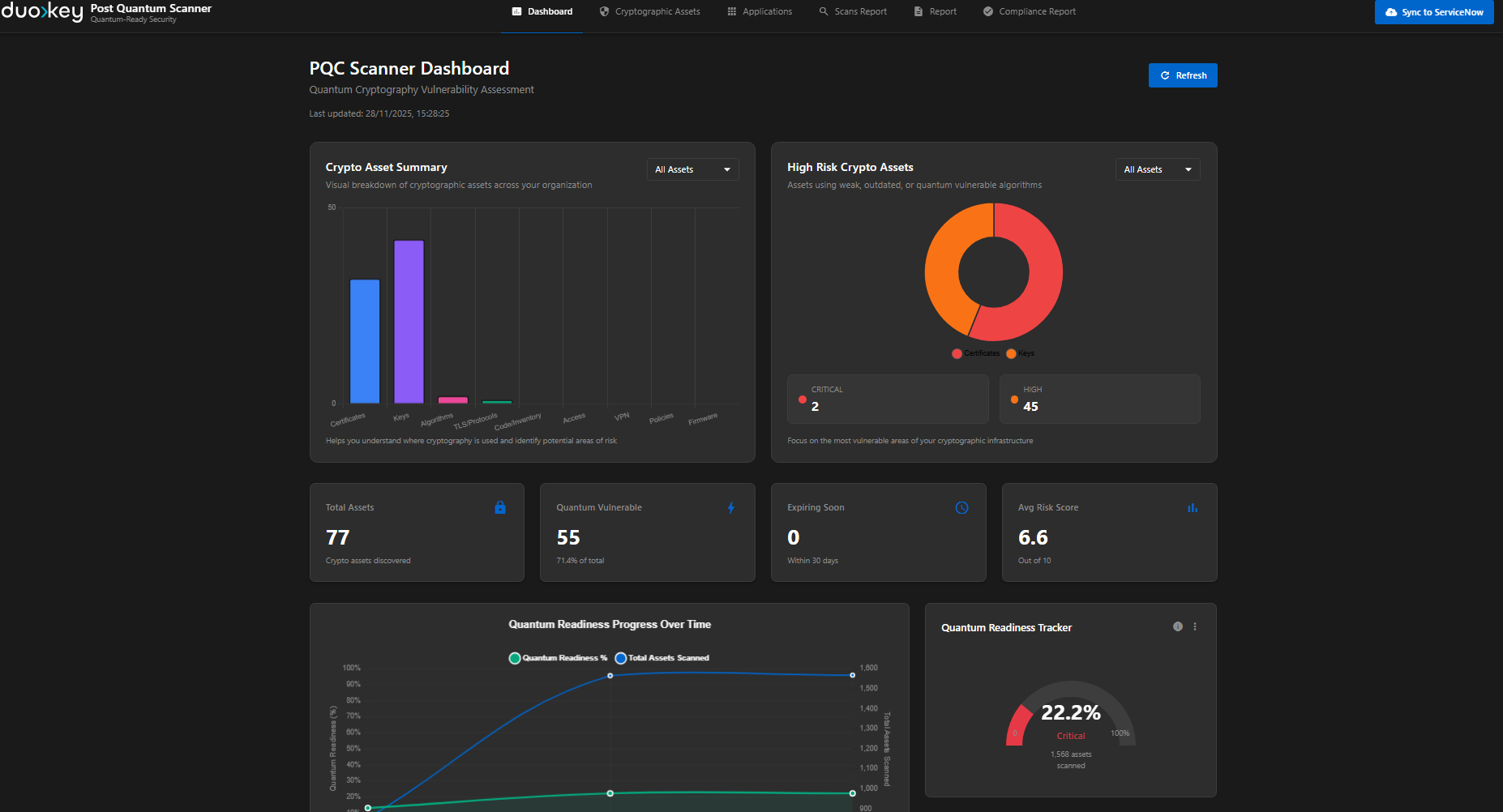
The ServiceNow dashboard displays quantum-vulnerable assets by severity, compliance status, and remediation progress.
Architecture Principles
Single Binary
Ships as one native executable per platform. No runtime dependencies, no JVM, no Python interpreter. Just copy and run.
Concurrent by Design
Network I/O runs concurrently, and CPU-bound work (file parsing, rule matching) is parallelized across worker threads for maximum throughput.
Zero OpenSSL
Modern TLS and certificate parsing with no OpenSSL or C-library dependencies for cryptographic operations.
Modular Scanners
Each scan command is an independent module. New scanners can be added without modifying existing code.