ServiceNow Integration
ServiceNow Integration
The PQC Scanner seamlessly integrates with ServiceNow to provide centralized visibility and management of all cryptographic findings and compliance issues across your organization.
Publishing findings to ServiceNow is configured and executed inside DuoKey Cockpit against a saved scan result. Any dke-scanner-agent servicenow ... command shown below illustrates the publishing concept but is not a real CLI subcommand — the real, current CLI surface (filesystem, domain, inventory, source-code, ci, cbom, …) is documented in the CLI Reference; the CMDB CI-linking flags (--ci-id, --ci-name, --environment, …) shown further below on this page are real and available on the scan commands.
Architecture Overview
The scanner reports all findings, vulnerabilities, and compliance status to a comprehensive ServiceNow dashboard through REST API integration. This enables security teams to track, prioritize, and remediate cryptographic risks within their existing ServiceNow workflows.
PQC Scanner to ServiceNow Dashboard Integration
TLS Endpoint Scanner
Scans network endpoints, detects TLS versions & cipher suites
CBOM Generator
Tracks cryptographic libraries like OpenSSL, BouncyCastle, MS CNG
Source Code Scanner
Detects vulnerable crypto functions with file paths & line numbers
Certificate Inspector
X.509 certificate analysis, algorithm & key size detection
ServiceNow Dashboard Panels
Vulnerability Overview
Visual representation by severity with priority indicators
Compliance Status
NIST PQC, BSI TR-02102, CNSA 2.0 readiness scores
Asset Inventory
Endpoints, certificates, keystores, crypto library dependencies
Action Items
Prioritized remediation tasks with automated ticket creation
Key Integration Features
Real-Time Data Synchronization
Automated Reporting
- Scan results automatically pushed to ServiceNow via REST API
- Real-time updates as new vulnerabilities are discovered
- JSON-formatted data for seamless integration
- Configurable sync frequency (continuous, scheduled, or on-demand)
Data Flow Architecture
- Scanner Components - Comprehensive cryptographic discovery
- Results Aggregation - Consolidate findings from all modules
- API Layer - Transform and transmit data to ServiceNow
- Dashboard - Display, track, and manage findings
ServiceNow Dashboard Capabilities
- Visual representation of quantum-vulnerable assets by severity
- Critical findings (RSA-1024, DSA-1024) highlighted with HIGH priority
- Medium-term risks (RSA-2048, ECC P-256) tracked for planning
- PQC migration progress monitoring with status indicators
Dashboard Screenshots
Vulnerability Dashboard
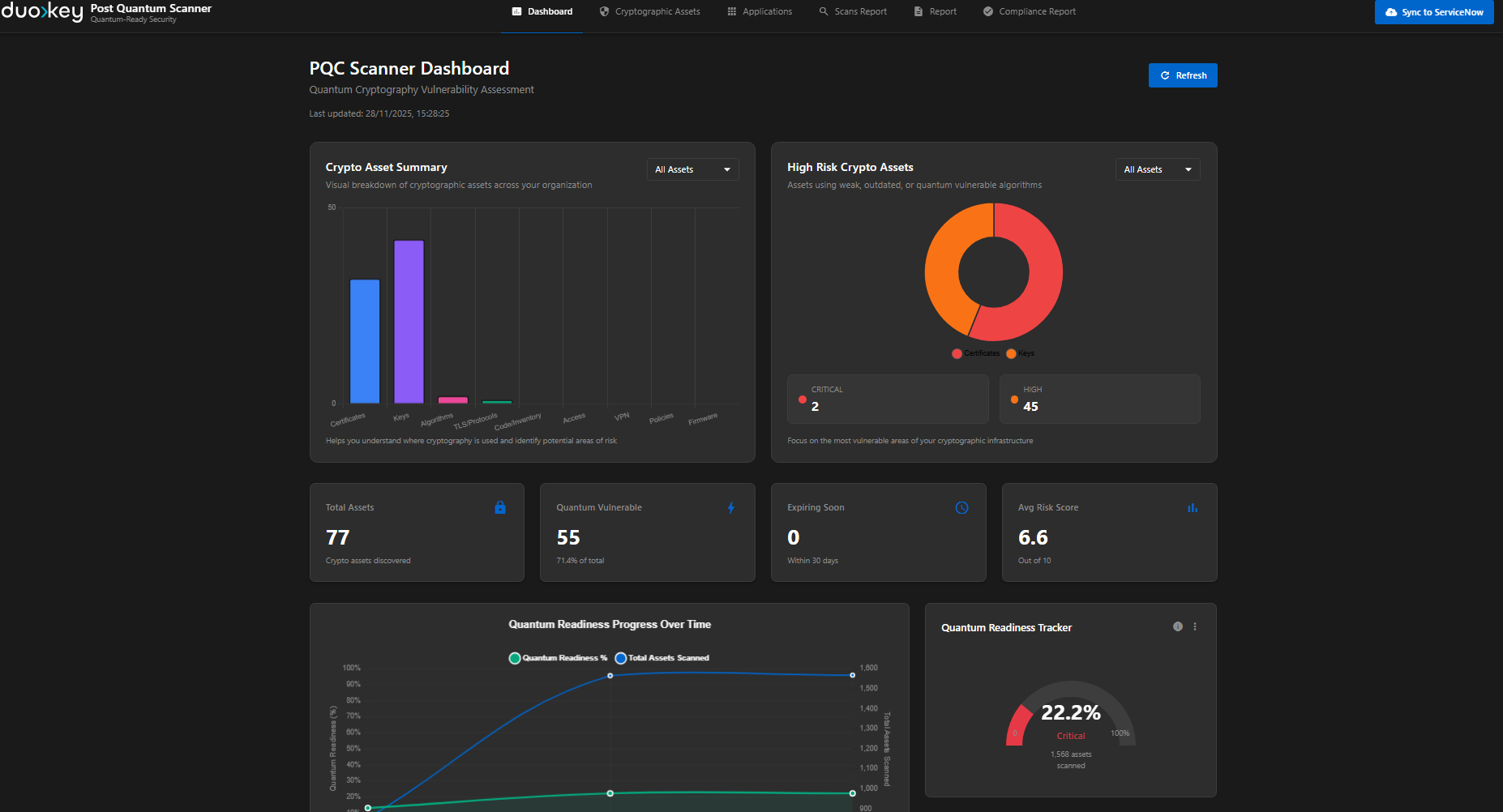
The main dashboard provides an at-a-glance view of your organization's cryptographic posture, highlighting critical vulnerabilities and compliance status.
Compliance Report View
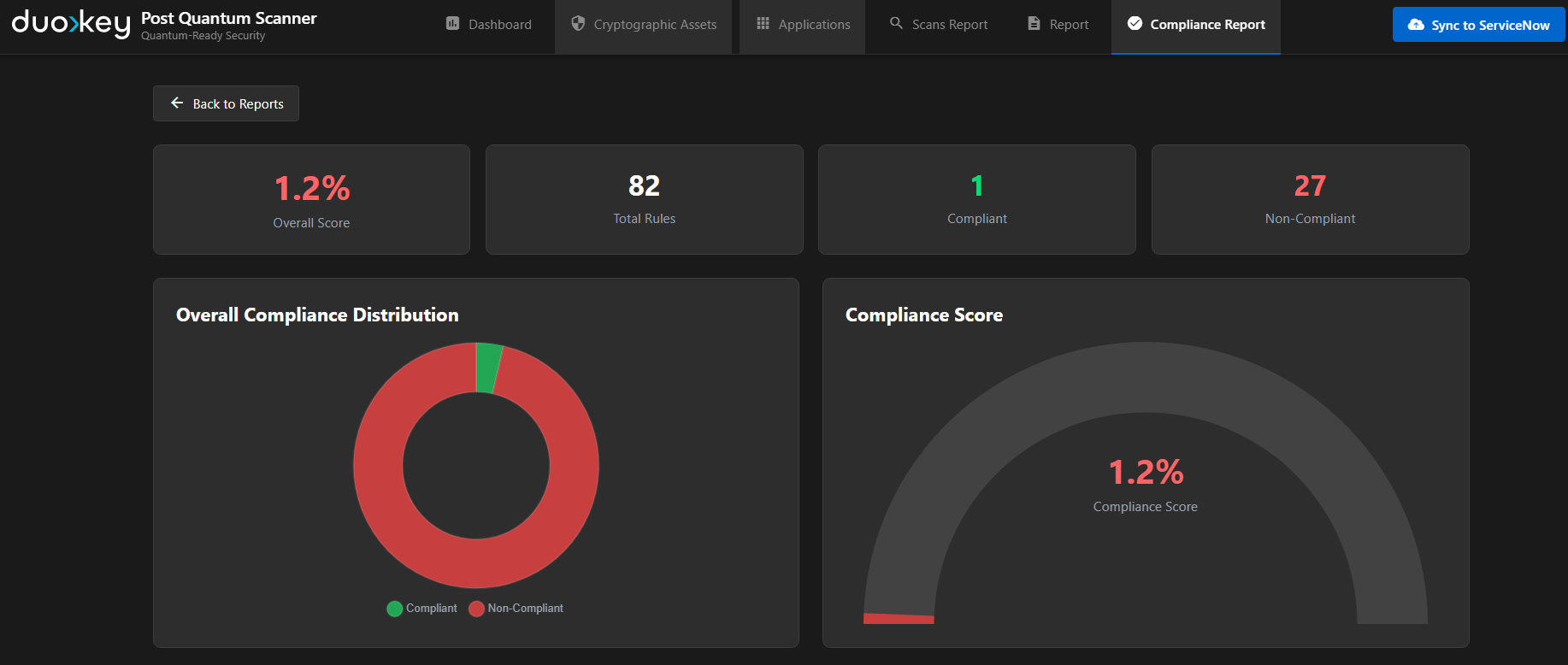
Detailed compliance reporting shows alignment with industry standards and regulatory requirements, with drill-down capabilities for specific findings.
Scan Results Interface
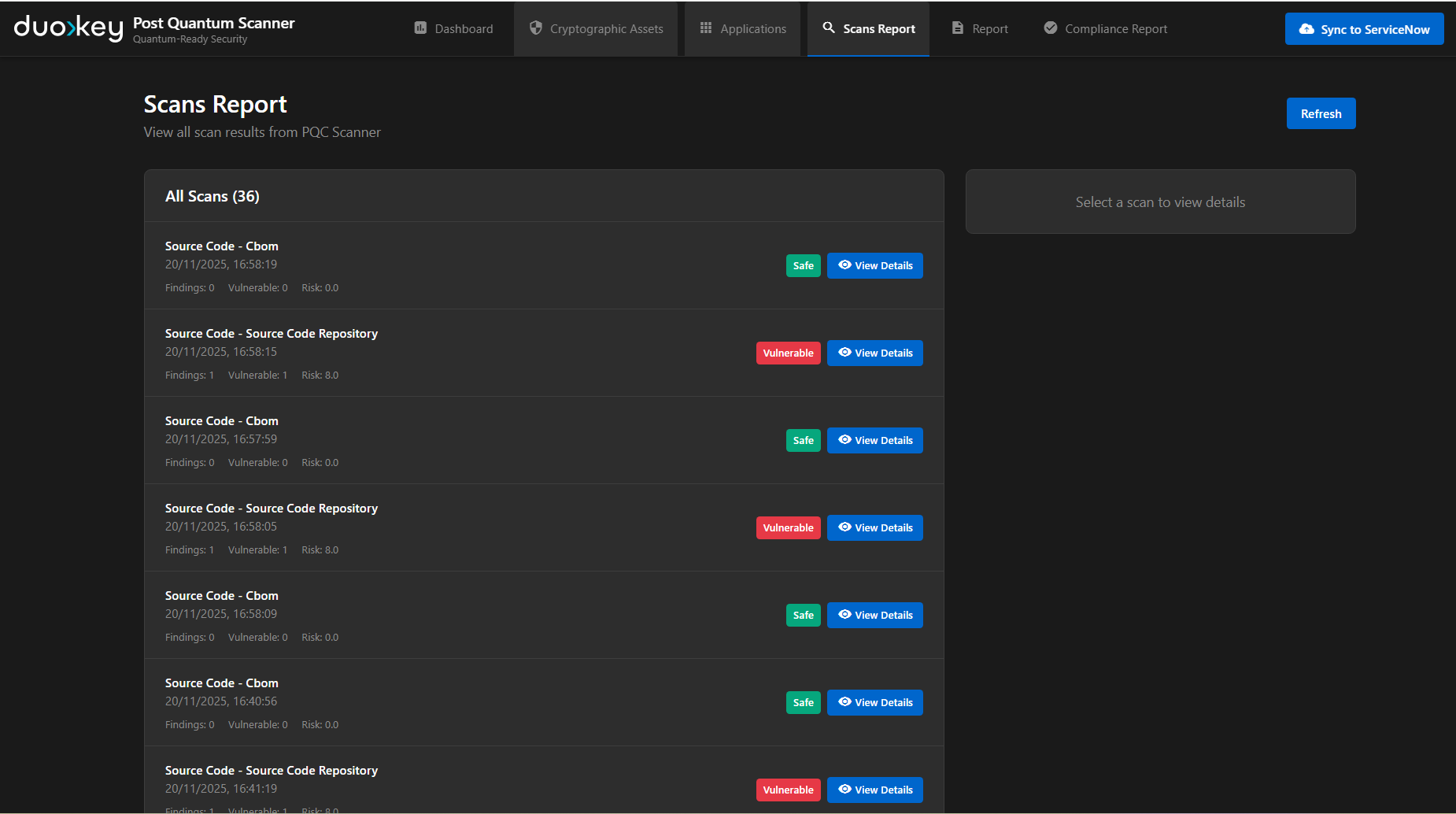
Individual scan results are tracked with full context, including affected systems, vulnerability details, and recommended remediation steps.
Integration Configuration
Prerequisites
Prerequisites
- ServiceNow instance with Security Operations module
- API credentials (OAuth 2.0 or Basic Authentication)
- Custom table creation permissions
- Workflow designer access (for automation)
- PQC Scanner version 1.0 or higher
- Network connectivity to ServiceNow instance
- API endpoint configuration
- Authentication credentials properly configured
Setup Steps
Configure ServiceNow Custom Tables
- Create custom tables for PQC scan results
- Define fields for vulnerability data, compliance metrics
- Set up relationships between tables
Generate API Credentials
- Create ServiceNow API user account
- Generate OAuth tokens or API keys
- Configure appropriate permissions and roles
Configure Scanner Integration
- Update scanner configuration with ServiceNow endpoint
- Add authentication credentials
- Configure data mapping and sync frequency
- Test connectivity and data flow
Set Up Automation Workflows
- Create automatic ticket generation rules
- Configure notification workflows
- Set up escalation procedures
- Define SLA policies
CMDB CI Linking
The scanner supports linking cryptographic findings to CMDB Configuration Items in ServiceNow, enabling end-to-end traceability from crypto assets to business applications.
How CI Linking Works
When scanning, you can provide a CI identifier and name via CLI flags or environment variables. These are propagated to every finding and mapped to ServiceNow fields during publishing:
| Source | ServiceNow Field | Description |
|---|---|---|
| ci_id | u_related_ci | CMDB CI sys_id (32-char hex) — creates a direct link to the Configuration Item record |
| ci_name | u_business_application | Human-readable application display name |
| environment | u_environment | Environment classification (Production, Staging, Dev, Test) |
Providing CI Context
CI context can be provided through multiple methods, in order of precedence:
# Scan with CI linking
dke-scanner-agent filesystem \
  --path /etc/ssl/certs \
  --ci-id "a1b2c3d4e5f6a7b8c9d0e1f2a3b4c5d6" \
  --ci-name "Payment Gateway" \
  --environment production \
  --owner "[email protected]"

# Then publish to ServiceNow
dke-scanner-agent servicenow \
  --instance https://company.service-now.com \
  --token $SERVICENOW_TOKEN \
  --input scan-results.json
Web UI CI Linking
The web dashboard also supports CI linking directly from the UI: you can search your CMDB Configuration Items and link or unlink a cryptographic asset to a CI without leaving the dashboard.
Detailed API endpoints are documented separately in the Developer Docs.
The CI identifier must be a valid 32-character hexadecimal ServiceNow sys_id for the Configuration Item link to be populated. Invalid formats are silently ignored, leaving the link empty.
API Data Format
The scanner transmits data to ServiceNow in the following JSON structure:
{
  "scan_id": "pqc-scan-20250128-001",
  "timestamp": "2025-01-28T14:30:00Z",
  "organization": "Example Corp",
  "findings": {
    "total_endpoints": 1247,
    "vulnerable_endpoints": 342,
    "critical_findings": 89,
    "high_findings": 156,
    "medium_findings": 97,
    "vulnerabilities": [
      {
        "id": "VULN-RSA1024-001",
        "severity": "CRITICAL",
        "type": "Quantum-Vulnerable Algorithm",
        "algorithm": "RSA-1024",
        "ci_id": "a1b2c3d4e5f6a7b8c9d0e1f2a3b4c5d6",
        "ci_name": "Payment Gateway",
        "environment": "production",
        "affected_systems": [
          "prod-web-01.example.com",
          "api-gateway-02.example.com"
        ],
        "risk_score": 9.5,
        "remediation": "Upgrade to RSA-4096 or migrate to PQC algorithm",
        "compliance_impact": ["NIST-PQC", "BSI-TR-02102"]
      }
    ]
  },
  "compliance": {
    "nist_pqc_score": 45,
    "bsi_tr_02102_score": 52,
    "cnsa_2_0_ready": false,
    "gaps": [
      "342 endpoints using deprecated algorithms",
      "89 critical vulnerabilities requiring immediate action"
    ]
  },
  "recommendations": [
    "Prioritize RSA-1024 algorithm replacement",
    "Plan PQC migration for high-value assets",
    "Update cryptographic libraries to latest versions"
  ]
}
ServiceNow Crypto Asset Record
Each finding is converted to a ServiceNow crypto asset record with the following key fields:
| ServiceNow Field | Source | Description |
|---|---|---|
| u_related_ci | ci_id | Link to CMDB Configuration Item (sys_id) |
| u_business_application | ci_name | Business application display name |
| u_environment | environment | Environment (Production, Staging, Dev) |
| u_algorithm | algorithm | Cryptographic algorithm detected |
| u_risk_score | risk_score | Quantum vulnerability risk score |
| u_severity | severity | Finding severity (Critical, High, Medium, Low) |
| u_source | source | Scan source (filesystem, domain, agent, etc.) |
| u_location | location | Asset location (file path, URL, etc.) |
Benefits of ServiceNow Integration
Centralized Management
- Single pane of glass for all cryptographic vulnerabilities
- Integration with existing IT security workflows
- Unified reporting across all security domains
Improved Efficiency
- Automated ticket creation reduces manual effort
- Prioritization based on risk scores accelerates remediation
- Workflow automation ensures timely response
Enhanced Visibility
- Executive dashboards for leadership reporting
- Team-level views for operational management
- Historical trending for strategic planning
Compliance Assurance
- Continuous compliance monitoring
- Audit trail for regulatory requirements
- Documentation for certification processes
Integrate PQC Scanner with ServiceNow early in your quantum readiness journey to establish baseline metrics and track improvement over time.